Introduction: The Magic of Intelligent Lighting
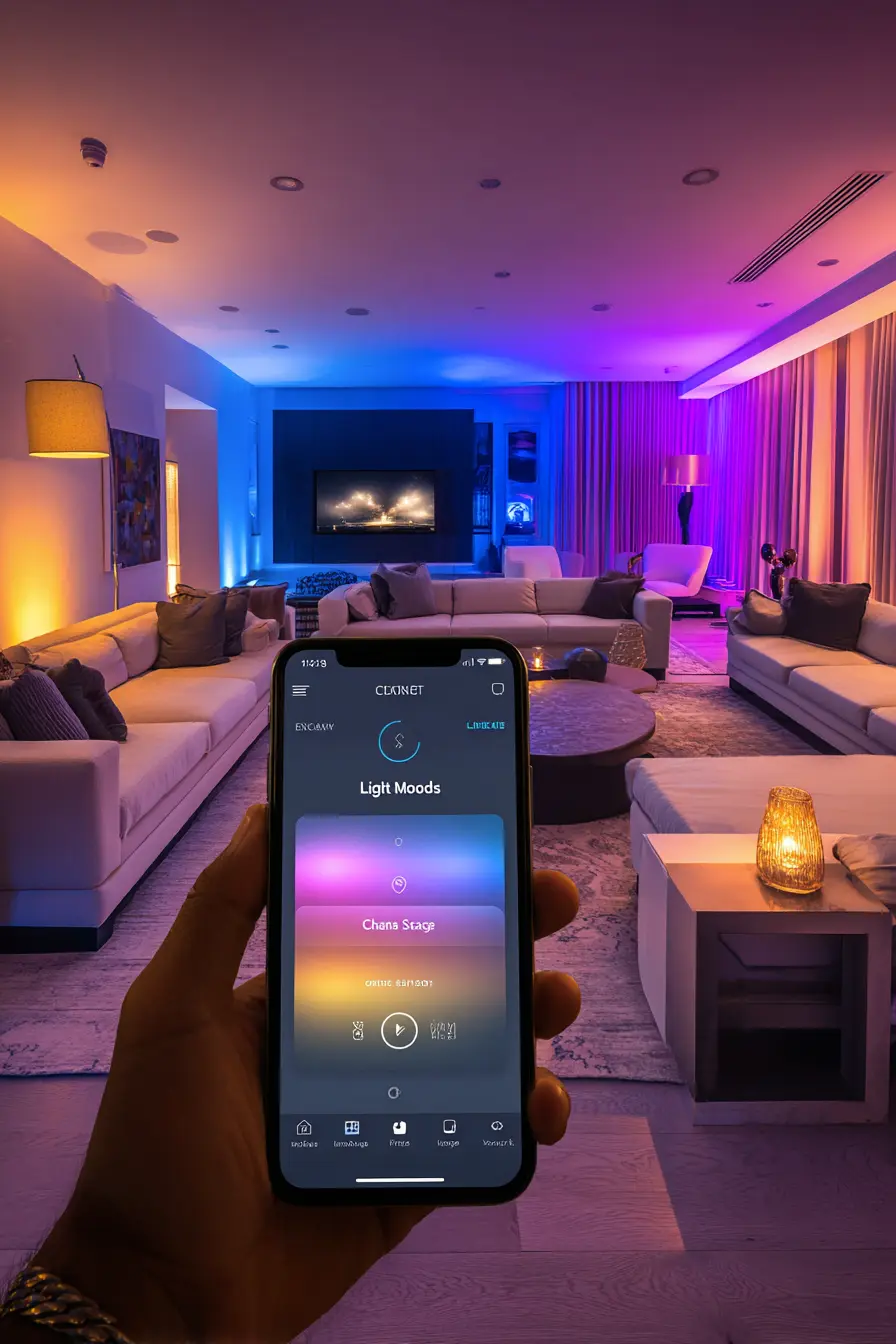
Imagine coming home after a long day at work. As soon as you open the door, the hallway light automatically dims to a warm welcome scenario, while a cozy evening atmosphere is already set in the living room. No searching for the light switch, no harsh white light late at night. This is the world of Smart Home Lighting. Intelligent lighting is often the first step into the connected home. It offers not only comfort and security but can also significantly contribute to well-being and energy savings. In this comprehensive guide, you will learn everything you need to know as a beginner to put your home in the perfect light.

What is Smart Home Lighting Exactly?
At its core, smart lighting is about controlling light sources digitally. Unlike traditional light bulbs, which can only be switched on or off via a physical switch, smart bulbs are equipped with a microchip and a wireless module. This allows control via app, voice command, or automated rules.
Bulbs vs. Switches: Where to Start?
There are two basic ways to make your lighting smart:
- Smart Bulbs: You simply replace your existing E27, E14, or GU10 bulbs with smart versions. This is the easiest way as no electrical installation is required.
- Smart Light Switches: Here, the wall switch itself is replaced. This has the advantage that conventional lamps also become smart, and control still works even if someone flips the physical switch.
The Most Important Wireless Standards at a Glance
For your lamps to communicate with your smartphone or hub, they use different wireless technologies. The choice of standard is crucial for the stability and expandability of your system.
Zigbee
Zigbee is the gold standard for smart lighting (used by Philips Hue and IKEA TRÅDFRI). It is extremely energy-efficient and builds a mesh network. This means: each lamp passes the signal to the next, which enormously increases the range.
Wi-Fi
Wi-Fi bulbs (like those from TP-Link or Govee) do not require a separate hub. They connect directly to your router. This is inexpensive for getting started but can overload your Wi-Fi if you have many devices.
Matter and Thread
Matter is the new, cross-manufacturer standard. It aims to ensure that devices from Apple, Google, Amazon, and Samsung work together seamlessly. Thread is the modern wireless protocol behind it, which, like Zigbee, forms a mesh network but is faster and more secure.
Popular Systems for Beginners
If you want to start today, several proven ecosystems are available to you:
- Philips Hue: The premium system. It offers the best light quality, the most stable app, and the largest selection of accessories, but it is also the most expensive.
- IKEA TRÅDFRI: The budget-friendly alternative. It also uses Zigbee and can often be integrated into the Hue system (with some effort).
- Nanoleaf & Govee: Specialists for effect lighting and RGB panels. Ideal for gamers and accent lighting.
Step-by-Step to Your First Light Scene
Setup is remarkably easy nowadays. Here is a typical process:
1. Install the Hardware
Screw the smart bulbs into your sockets. Important: Always leave the physical light switch set to “On”.
2. Connect Bridge or Hub
If your system requires a bridge (like Philips Hue), connect it to your router. The bridge acts as the brain of your lighting system.
3. App Setup
Download the manufacturer’s app and follow the instructions to add new lamps. Usually, the lamps are automatically detected in pairing mode.
4. Create Rooms and Zones
Assign your lamps to virtual rooms (e.g., “Living Room”, “Bedroom”). This allows you to control all lights in a room with one click.
Creating Automated Lighting Scenes
The real advantage of smart home lighting lies in scenes and automations. Here are some inspirations for your daily life:
The Concentration Scene
Cool, bright white light (approx. 5000 Kelvin) promotes alertness. Program a scene for your workspace that starts automatically at 9:00 AM.
Movie Mode
One click on “Start Movie” and the living room light dims to 10%, while an LED strip behind the TV glows in a subtle blue.
Gentle Wake-up
Use the “Wake-up Light” function. The lights in the bedroom gradually brighten over a period of 30 minutes before your actual alarm, simulating a sunrise.
Automation through Sensors
Lighting only becomes truly smart when you no longer have to actively control it. This is where sensors come in:
- Motion Sensors: Ideal for hallways, bathrooms, or storage rooms. The light turns on when you enter the room and off again after 2 minutes of inactivity.
- Brightness Sensors: These measure the incoming daylight. When it gets dark outside, the ambient lighting turns on automatically.
- Door/Window Contacts: If you open the front door after sunset, the hallway light turns on automatically.
Advanced Tips for Perfect Light Quality
When buying, don’t just look at the smartness, but also at the light quality. The CRI value (Color Rendering Index) should be above 80, ideally above 90, so that colors look natural. Also, use indirect light (e.g., LED strips behind furniture) to avoid harsh shadows and visually enlarge the room.

Frequently Asked Questions
Do smart bulbs work if the internet goes out?
Yes, most systems (especially Zigbee-based ones like Hue) continue to work within your home via local hubs or remote controls even without an internet connection. Only remote control from away will not be possible.
Can I use smart bulbs with normal dimmers?
No, this is not recommended. Conventional wall dimmers change the power supply, which can damage the electronics of the smart bulb or lead to flickering. Use smart wireless switches instead.
How much power do smart bulbs consume on standby?
Standby consumption is very low, usually between 0.2 and 0.5 watts per bulb. By being able to control and automate light more precisely, you usually save more energy than the standby mode consumes.
Do I need a separate bridge for every room?
No, a single bridge is usually enough for the whole house (with Philips Hue up to 50 bulbs). Thanks to mesh technology, the bulbs amplify the signal among themselves.
Can I mix different brands?
Yes, thanks to standards like Zigbee and especially the new Matter standard, you can combine devices from different manufacturers in one app (like Apple Home or Google Home).
Is the installation safe for laypeople?
Replacing a light bulb with a smart bulb is perfectly safe. Only when replacing wall light switches should you turn off the fuse or consult an electrician.

- Minimalist Kitchen Decor: Less is More for Your Kitchen – 13. January 2026
- Modern Kitchen Decor: 7 Stylish Ideas for Your Kitchen – 12. January 2026
- Living Room Decor for Rental Apartments: Creative and Stylish Ideas – 7. January 2026

0 Comments